What do you think is Web Development?🤔
✏Welcome to the exciting world of Web Development! Imagine the internet as a gigantic library🎁 filled with millions of books📒(websites) that everyone can read.
Now, what if I told you you could be the author of these books?😎 That’s what web development is all about building the amazing websites and apps we use every day!👩👩👧👦👨👨👦👦👩👦👭
💻 Try It Yourself
Edit the code below and click Run to see the result.
Web development is the art and science of creating websites and web applications that people can access on the internet. Think of it like building a virtual house:
• You need bricks🧱and beams⚙to create the structure (HTML )
• You paint the walls and decorate the rooms to make it look awesome (CSS ).
• And finally, you add the lights, doors, and gadgets that make the house come alive (JavaScript ).
The Sides of Web Development
Front-End Development (The Face)
This is what you see and interact with on a website—buttons, images, menus, colors, and animations. It’s like designing the cover of your book to grab people’s attention. The key tools here are:
• HTML (HyperText Markup Language): The skeleton or structure.🎱
• CSS (Cascading Style Sheets): The style, colors, and design.
• CSS (Cascading Style Sheets): The style, colors, and design. • JavaScript: The action—making buttons clickable, forms interactive, and pages dynamic.
Back-End Development (The Brain)
This is what happens behind the scenes. When you fill out a form or log in, the back-end is the invisible superhero that processes your data, talks to databases, and gives you results. Key tools include:
• Programming languages like Node.js, PHP, or Python.⚡
• Databases like MySQL🧿 or MongoDB to store information.
3. Why is Web Development Important?
Think about your favorite websites: Instagram, YouTube, or even a fun game site. Behind every click and swipe, a web developer worked hard to make it happen. Web development:
• Connects people globally (like messaging apps ).
• Helps businesses grow (online stores ).
• Makes learning and entertainment accessible (hello, cat videos! ).
4. Tools of the Trade (Your Developer Toolbox )
Just like a chef needs knives and pans, a web developer has a set of tools:
• Code Editors like VS Code or Sublime Text. • Browsers to test your work (Google Chrome, anyone?). • Frameworks and libraries like React or Bootstrap (think of them as recipe books that make coding faster).
5. The Web Developer Superpowers
Becoming a web developer makes you part artist, part problem-solver, and part magician. Here’s what you’ll be able to do:
• Design beautiful websites.
• Solve real-world problems, like creating apps to deliver pizza or book movie
• Build things that people across the globe can use and enjoy.
6. A Fun Fact to Wow You
Did you know the first-ever website is still live? It was created by Sir Tim Berners-Lee in 1991 and looked like…well, let’s just say we’ve come a long way. But it’s a reminder that even the simplest websites can change the world!
Your First Steps in Web Development
Ready to start? Here's what you'll learn:
1. HTML: Write your first webpage you’ll create your own “Hello, World!”
2. CSS: Make your page look gorgeous colors, fonts, and even rainbows
3. JavaScript: Add magic, like making a button say “BOO!”
SCROLL DOWN TO START BUILDING YOUR FIRST HTML WEB PAGE
Why Do We Have To Use HTML5??
🎯🎯HTML5 is a major revision of the HyperText Markup Language (HTML) and serves as the foundation of modern web development. Its purpose is to enhance the structure, functionality, and flexibility of web applications and websites. Below are its key roles and purposes:
💻 Try It Yourself - Full HTML5 Webpage
Edit or Run to see your own mini website!you can copy code free!
1. Enhanced Structure and Semantics
HTML5 introduces several new semantic elements such as <header>, <footer>,
<article>, <section>, and <aside>. These elements provide clearer meaning and better
organization to web page content, making it easier for developers to read and maintain the code.
They also improve accessibility for screen readers and assistive technologies, helping users with
disabilities navigate pages more effectively.
For example:
<header>
  <h1>Welcome to My Website</h1>
</header>

<section>
  <article>
    <h2>Latest News</h2>
    <p>HTML5 brings a new era of web development!</p>
  </article>
</section>

<footer>
  <p>© 2025 MyWebsite. All Rights Reserved.</p>
</footer>
2. Support for Multimedia
HTML5 natively supports multimedia elements like <audio> and <video>, eliminating the
need for third-party plugins like Flash. These tags come with built-in controls and can handle
multiple file formats such as MP4, WebM, and Ogg.
Example:
<video width="400" controls>
  <source src="video.mp4" type="video/mp4">
  Your browser does not support the video tag.
</video>

<audio controls>
  <source src="music.mp3" type="audio/mpeg">
  Your browser does not support the audio tag.
</audio>
3. Interactive and Dynamic Content
HTML5 includes new elements like <canvas> and <svg> for creating graphics, charts,
animations, and even games directly in the browser without external software.
Example using <canvas>:
<canvas id="myCanvas" width="300" height="150" style="border:1px solid black;"></canvas>
<script>
  const canvas = document.getElementById("myCanvas");
  const ctx = canvas.getContext("2d");
  ctx.fillStyle = "blue";
  ctx.fillRect(20, 20, 100, 100);
</script>
4. Cross-Platform Compatibility
HTML5 works consistently across all modern browsers and devices — desktops, tablets, and
smartphones. It supports responsive web design, ensuring web pages automatically adapt to
different screen sizes and orientations. Developers can use tools like CSS media queries or
frameworks such as Bootstrap to achieve full responsiveness.
5. Offline Capabilities
HTML5 allows certain web applications to function without an internet connection using features
like Service Workers and Application Cache. This is useful for apps like note-taking tools,
calculators, or simple games that users may want to access offline.
Example:
// Register a Service Worker
if ('serviceWorker' in navigator) {
  navigator.serviceWorker.register('/service-worker.js');
}
6. Improved Form Elements
HTML5 enhances forms with new input types such as email, date, range, color,
and attributes like required, placeholder, and pattern. These additions simplify data
validation and improve the user experience.
Example:
<form>
  Email: <input type="email" required><br>
  Birthdate: <input type="date"><br>
  Favorite Color: <input type="color"><br>
  Age: <input type="number" min="1" max="100"><br>
  <input type="submit" value="Submit">
</form>
7. Performance and Efficiency
HTML5 reduces dependency on third-party plugins, resulting in faster load times and fewer
compatibility issues. It allows browsers to optimize rendering, providing smoother and more
efficient user experiences — especially for multimedia-heavy sites or mobile devices.
8. Support for Modern APIs
HTML5 integrates seamlessly with several powerful APIs that extend web functionality. Examples
include:
- Geolocation API: Detect a user’s location (e.g., for maps or weather apps).
- Web Storage API: Save user data locally using
localStorageorsessionStorage. - WebSocket API: Enable real-time communication for chat apps and games.
- Drag-and-Drop API: Allow users to drag and drop files or elements interactively.
Example:
// Geolocation Example
navigator.geolocation.getCurrentPosition((pos) => {
  console.log("Latitude:", pos.coords.latitude);
  console.log("Longitude:", pos.coords.longitude);
});
9. Search Engine Optimization (SEO)
Semantic HTML5 elements like <article>, <header>, and <section> help search engines
better understand a page’s structure and content, which improves indexing and search ranking.
This means well-structured HTML5 pages often perform better in Google search results.
10. Future-Proofing
HTML5 is designed to be forward-compatible, setting the standard for modern web development.
It ensures that web pages remain functional, adaptable, and relevant as technology and browser
capabilities evolve. Learning HTML5 now gives developers a strong foundation for building next-generation web applications.
In summary
HTML5 empowers developers to build faster, more interactive, and more accessible web
applications. It improves performance, enhances user experience, and ensures long-term
compatibility across all devices and platforms — making it the core technology of modern web
development.
SCROLL DOWN TO START BUILDING YOUR FIRST HTML WEB PAGE USING HTML 5
✨Welcome to the world of HTML5??✨
Objectives🎯
By the end of this tutorial, you’ll be able to:🎢
Understand the structure and purpose of HTML5📢
Build basic web pages using HTML5 elements.📢
Master semantic HTML for a well-organized and accessible web structure.📢
🎇Building the Foundation: HTML5 Basics 🎇
HTML5 is like the LEGO bricks of the web. Each tag is a brick, helping you construct beautiful web pages!
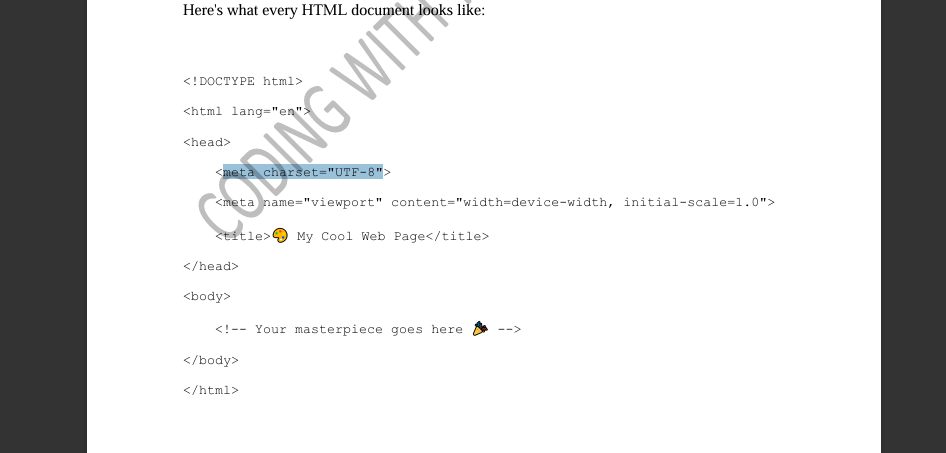
The Blueprint: Structure of an HTML Document Here's what every HTML document looks like:
Let’s Break It Down:
`!DOCTYPE html`: Tells browsers you’re using HTML5
`html lang="en"`: Starts the HTML zone don’t forget the `lang="en"` for accessibility!
`head`: Think of this as the control room where you load important tools like fonts, titles, and styles
`body`:The canvas for all your web page content!
🎇Adding Components to Your Page: Common Tags🎇
Here’s where the fun starts!You can use these tags to create content that pops:
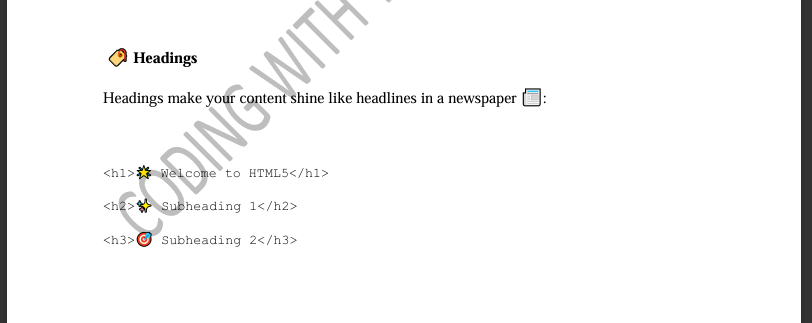
Paragraphs Write amazing content with `p`
🔤 Basic Elements Demo
Play with headings, paragraphs, lists, and images.
🧱 Semantic Layout (header/nav/section/article/footer)
Edit and run to preview a simple semantic HTML5 layout.
✨Introduction to Accessibility and SEO Basics ✨
Objectives🎯
Understand the importance of accessibility and SEO in web development🎢
Learn techniques to make web pages accessible to everyone.📢
Discover basic SEO strategies to improve visibility. 📢
🎇Content Overview 🎇
1. Understanding Accessibility in Web Development
Web accessibility ensures that websites can be used by everyone, including people with disabilities. It’s not just ethical but also improves user experience and compliance with standards like WCAG (Web Content Accessibility Guidelines).
Key Concepts of Accessibility
Perceivable: Content must be presented in ways that users can perceive (e.g., using alt text for images).
Operable: Users should navigate and interact with the website easily (e.g., keyboard navigation)
Understandable: Content should be clear and predictable.
Robust: Works across various devices and browsers.
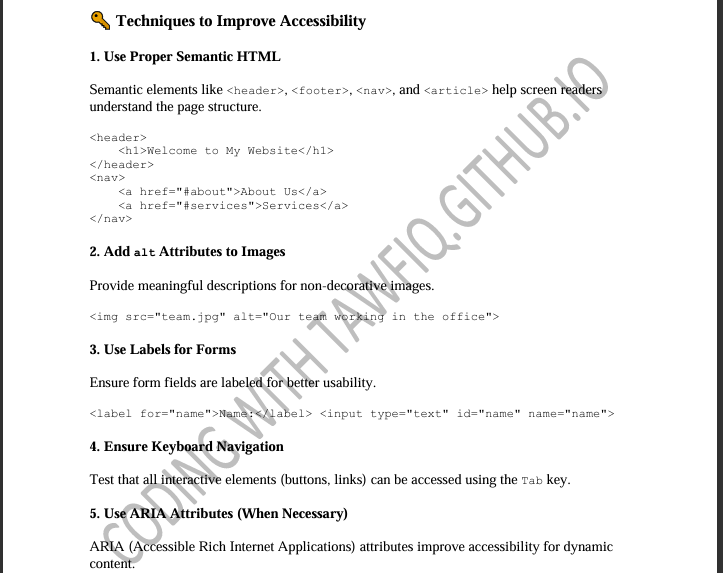
HERE ARE TECHNIQUES TO IMPROVE ACCESSIBILITY
2. Basics of SEO (Search Engine Optimization) (1 Hour)
SEO makes your website discoverable by search engines like Google, increasing traffic and visibility.
Key Concepts of SEO
• On-page SEO: Optimizing content, titles, and metadata.
• Off-page SEO: Building backlinks from other websites.
• Technical SEO: Improving website speed, mobile-friendliness, and structure.
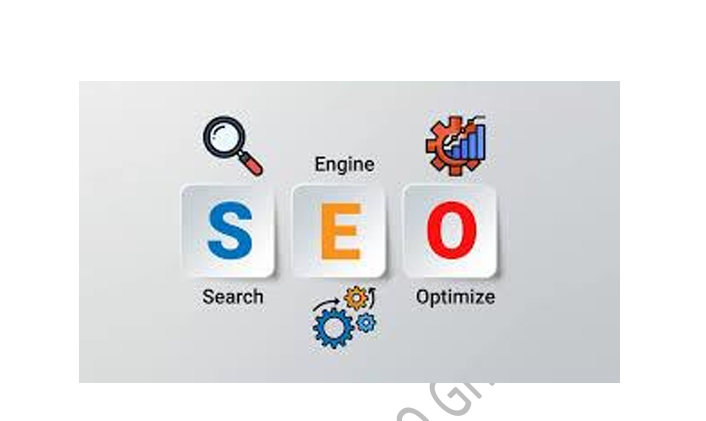
Here are Techniques to Improve SEO
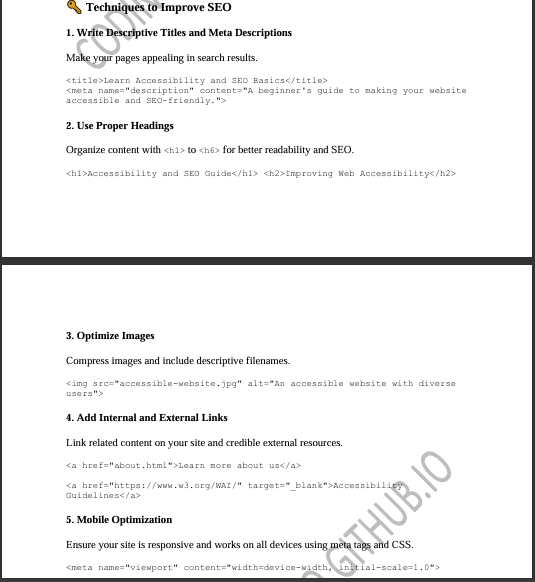
3. Combine Accessibility and SEO
Why Accessibility Helps SEO
• Search engines reward accessible practices, as they align with good user experience.
• Accessible websites often rank higher because they’re more user-friendly and compliant.
Summary
• Accessibility ensures everyone can use your site.
• SEO increases your site’s visibility.
• Both are essential for modern, user-friendly web development.
🎨Ready to level up your skills? Dive into practice and start building amazing,🎞🎪 inclusive, and optimized websites!
♿ Accessible Form
Labels, required fields, and ARIA attributes in action.
🎨 Canvas Drawing
Draw shapes on an HTML5 canvas using JavaScript. Modify colors or add shapes and rerun.